
Using RxResume with PayPerQ
RxResume is a free, open-source resume builder with AI integration capabilities that works seamlessly with PayPerQ's diverse model selection for enhanced resume writing.
What is RxResume?
RxResume (Reactive Resume) is a powerful, free and open-source resume builder that simplifies creating, updating, and sharing professional resumes. With built-in AI integration, 12 customizable templates, and multi-language support, it's trusted by professionals landing jobs at companies like Amazon, Google, and Twilio.
Key features include:
- Completely Free: No hidden costs or premium tiers
- Open Source: Full transparency and community-driven development
- AI Integration: Built-in OpenAI compatibility for content enhancement
- 12 Professional Templates: From minimalist to creative designs
- Multi-language Support: Available in 50+ languages
- Privacy Focused: Self-hostable with secure authentication
- Real-time Collaboration: Share and track resume views/downloads
Step by Step Set Up
1. Access RxResume
Go to rxresu.me and create your free account using GitHub, Google, or email authentication.
2. Create or Import Your Resume
Start with a template or import your existing resume data. RxResume supports various formats and provides intuitive editing tools.
3. Enable AI Integration
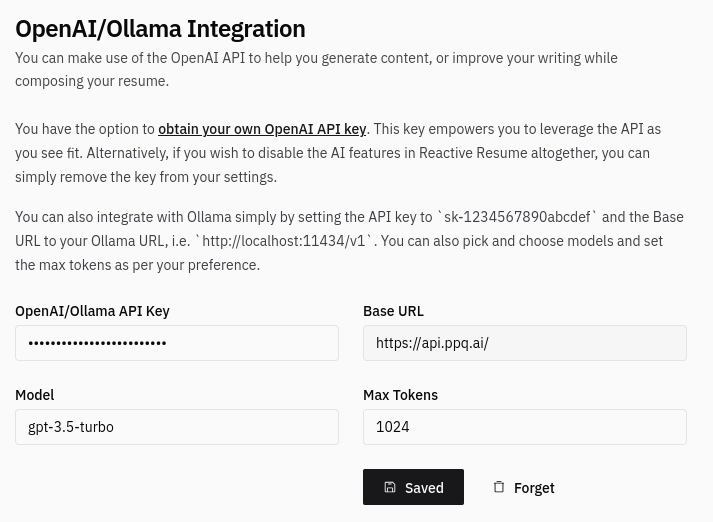
In your resume settings, navigate to the AI integration section and configure it to use OpenAI-compatible endpoints.
4. Configure PayPerQ Integration
- API Endpoint: Set to
https://api.ppq.ai - API Key: Enter your PayPerQ API key from ppq.ai/api-docs
- Model Selection: Choose your preferred model for content enhancement
Enhancing Your Resume with PayPerQ Models
Once connected, leverage PayPerQ's diverse model selection for different resume sections:
- Professional Summary: Use Claude for sophisticated, professional tone
- Work Experience: Use GPT-4 for detailed accomplishment descriptions
- Skills Section: Use specialized models to match industry keywords
- Cover Letters: Generate tailored content for specific positions
Simply select text in any resume section and use the AI assistant to refine, expand, or rewrite content based on your chosen PayPerQ model.
Advanced Tips
- Industry-Specific Optimization: Switch between models based on your target industry
- ATS Optimization: Use AI to incorporate relevant keywords for applicant tracking systems
- Multiple Versions: Create industry-specific resume variants using different AI models
- Content Refinement: Iterate on sections using various models for the best results
Problems?
Please contact us through the customer communication chatbot in the bottom right or in our telegram channel!
What is PayPerQ?
PayPerQ is the private way to use AI. You get the big-name models from Anthropic, OpenAI, Google and xAI, the best open-source models, and TEE models that run inside a hardware enclave where not even the model's host can see your data. Chat, image, video and audio, all in one place, with no account and no subscription. You top up a balance with crypto or a card, from as little as 10 cents, and pay only for what you use. Most users spend about $4 a month, against $20+ for a single ChatGPT subscription.
Privacy is built in rather than bolted on. Every chat request is served inside a secure enclave that PayPerQ's servers, staff and logs cannot read into, so PayPerQ never sees your prompts or responses. Choose a TEE model and the model's host cannot read them either.
Why Use PayPerQ?
- Private by default - chats are served inside a secure enclave PayPerQ cannot read, and every chat model shows its privacy tier (Anon, ZDR or TEE)
- No account needed - no sign-up and no email; a credit id is all it takes
- Pay with crypto or card - Bitcoin, Lightning, Monero, stablecoins and more, or a credit card
- Hundreds of AI models from every major provider in one place
- Pay per use - no subscriptions; top up from 10 cents and pay only for what you use, about 1 cent per query on average
- Your history stays yours - conversations are stored on your device by default
Getting Started
- Visit ppq.ai
- Top up your balance with crypto or a card (as little as 10 cents)
- Pick a model, check its privacy tier, and start chatting
No account, no sign-up. Fund and go.