
Using Msty Studio with PayPerQ
Msty Studio is a privacy-first AI interface that supports both local and online models, offering advanced features like Knowledge Stacks and Personas while keeping your data secure.
What is Msty Studio?
Msty Studio is a powerful, privacy-focused AI interface that brings advanced AI capabilities to your fingertips while keeping your data private and local. Unlike many other AI tools, Msty operates with zero telemetry and zero tracking, ensuring your conversations and data never leave your control.
Key features include:
- Privacy-First Design: No telemetry, no tracking, local-first storage
- Dual Model Support: Use both local models (via Ollama) and online models seamlessly
- Knowledge Stacks: Advanced RAG system for intelligent document management
- Personas: Create custom AI assistants with specific behaviors and tool access
- Cross-Platform: Available as both desktop application and web interface
- Advanced Workflows: Turnstiles for complex logic flows and MCP integrations
Step by Step Set Up
1. Download and Install Msty Studio
Go to msty.ai and click "Download Msty Studio". Select the version for your operating system:
- Windows: Download the .exe installer and run it
- macOS: Download the .dmg file and drag to Applications
- Linux: Download the .deb package and install with
dpkg -i MstyStudio_amd64.deb(Ubuntu/Debian) or use the AppImage
2. Configure PayPerQ API Provider
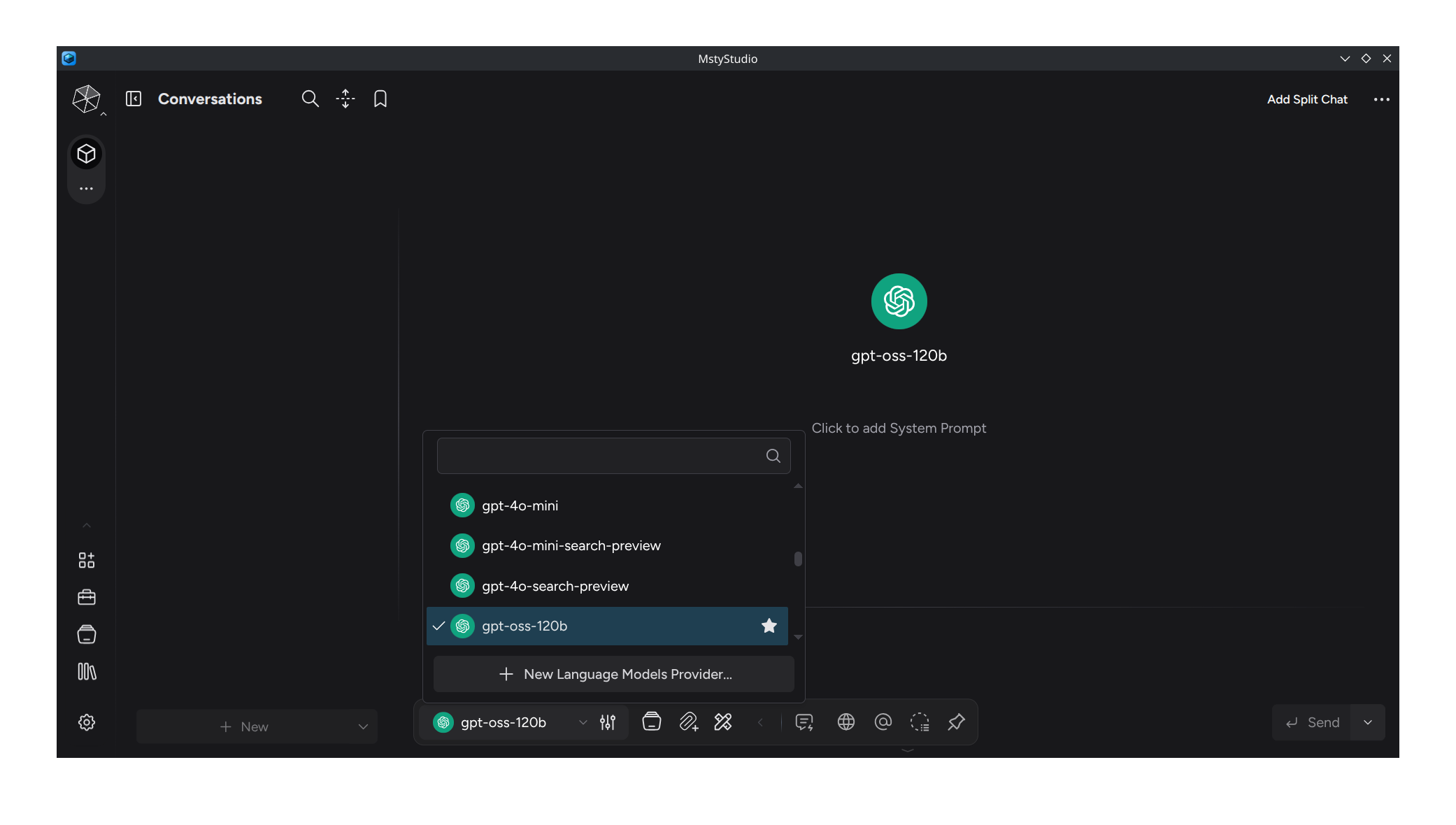
Open Msty Studio and look for the Model Selector at the bottom of the screen. Click on it, then select "New Language Models Provider...".
3. Select OpenAI Compatible Provider
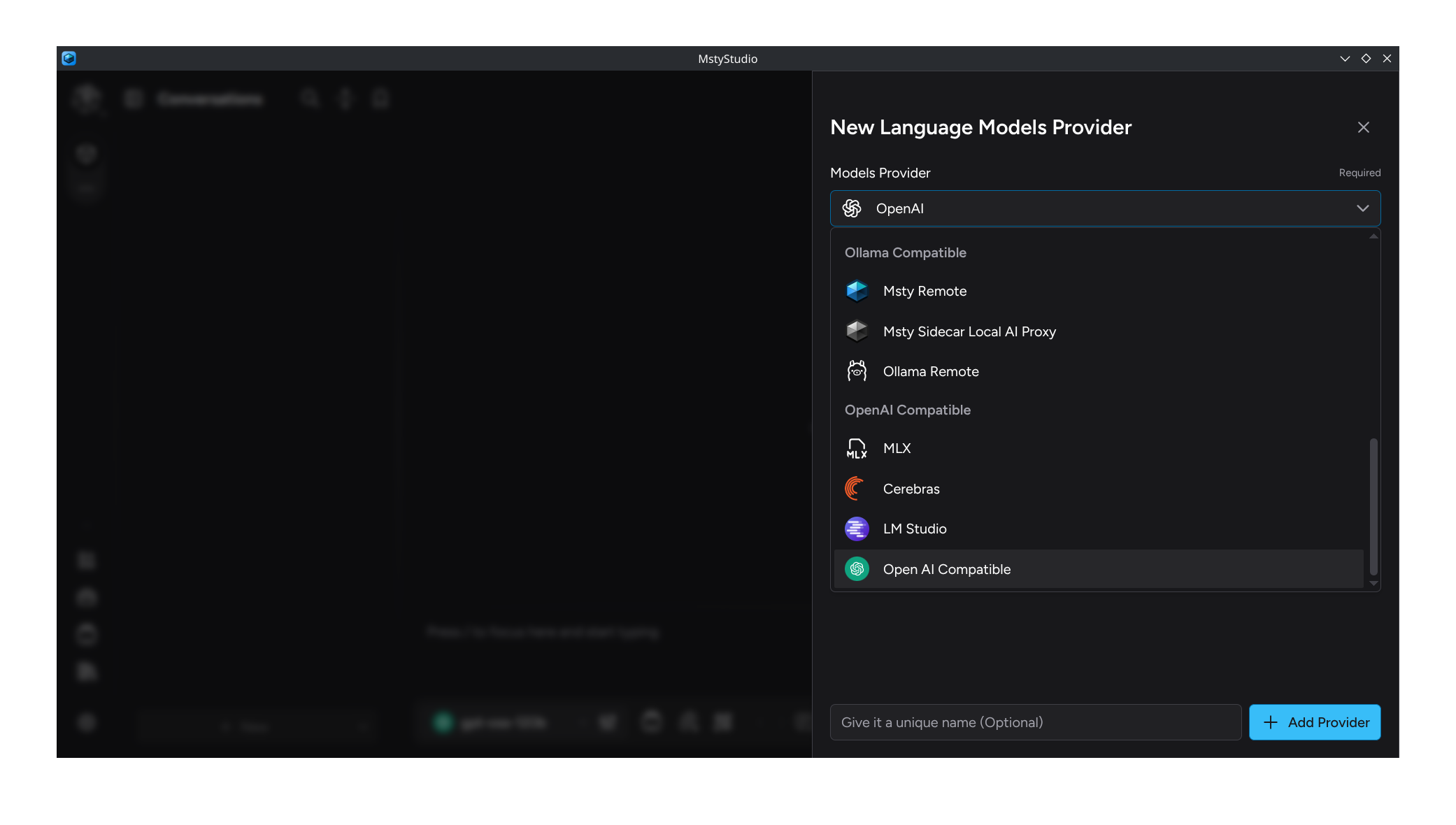
Choose "OpenAI Compatible" from the provider options to enable integration with PayPerQ's API endpoint.
4. Configure API Settings
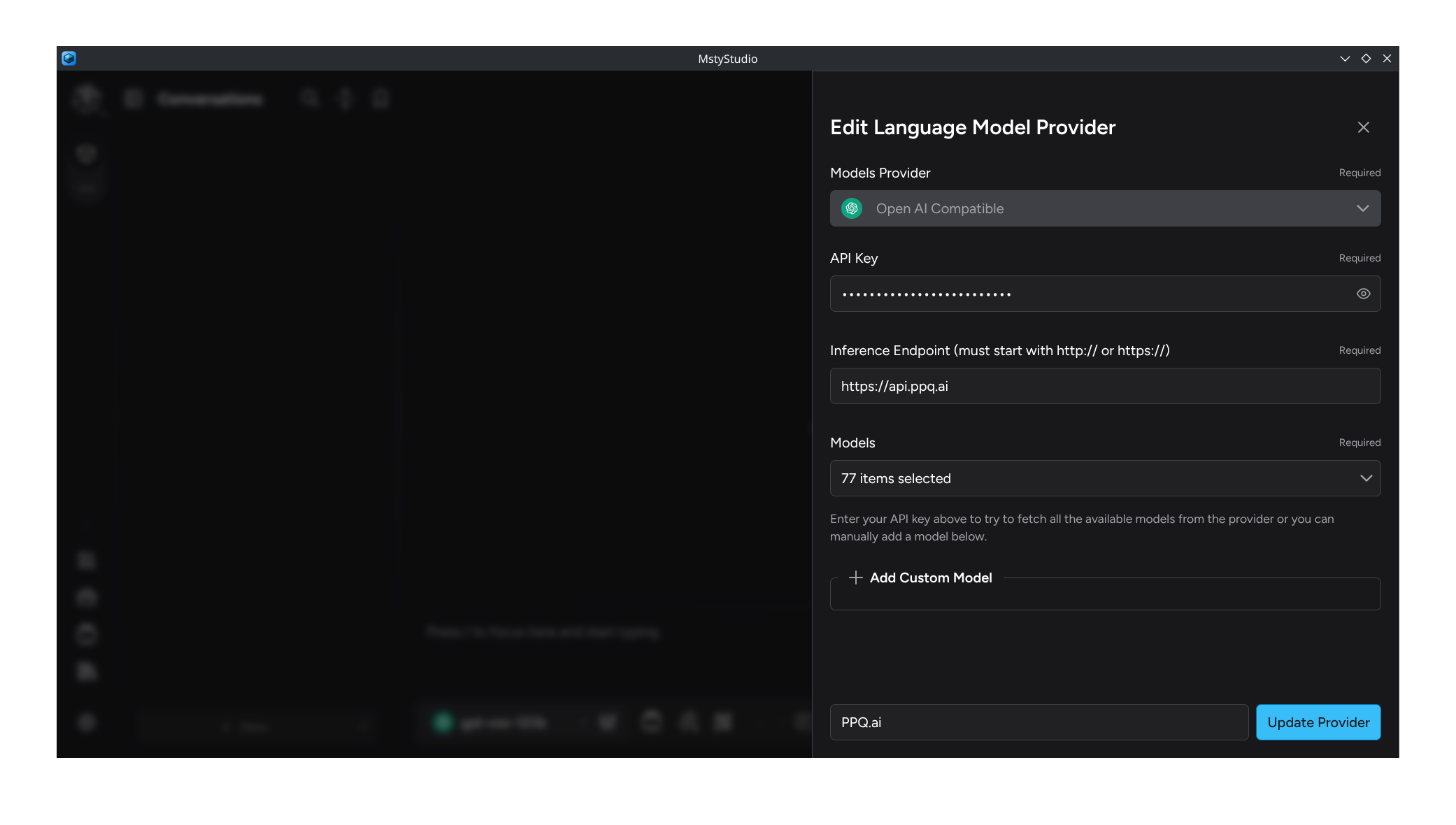
Fill in the configuration form with your PayPerQ credentials:
- API Key: Enter your PayPerQ API key (found at ppq.ai/api-docs)
- Inference Endpoint: Set to
https://api.ppq.ai
5. Select Available Models
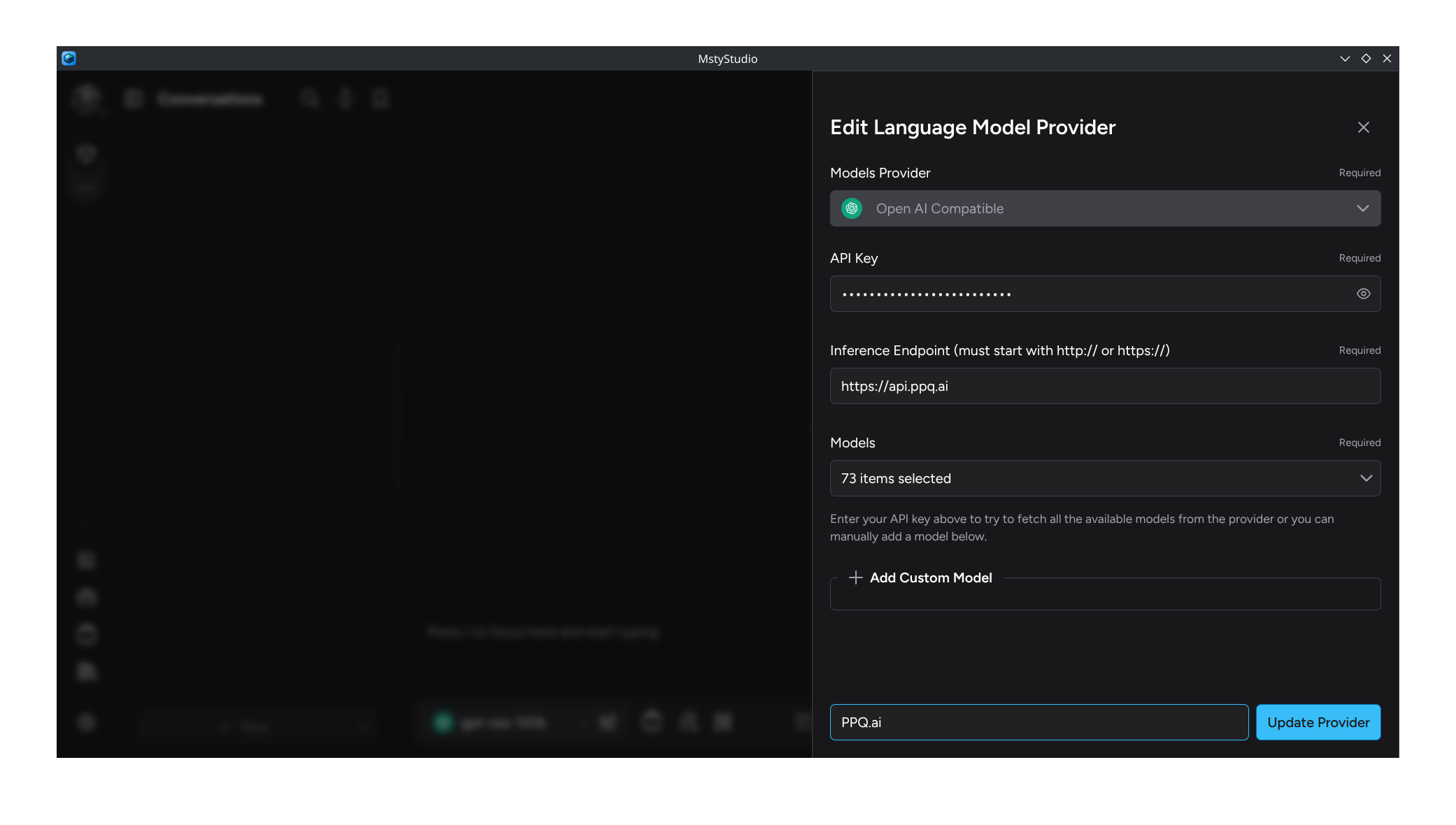
In the "Models" field, enable the models you want to use in Msty Studio by clicking each checkbox. You can click the top checkbox to select all available models at once.
6. Finalize Provider Setup
Name your provider "PayPerQ" or "PPQ.ai" for easy identification, then click "Add Provider" to complete the setup.
7. Start Using Msty Studio
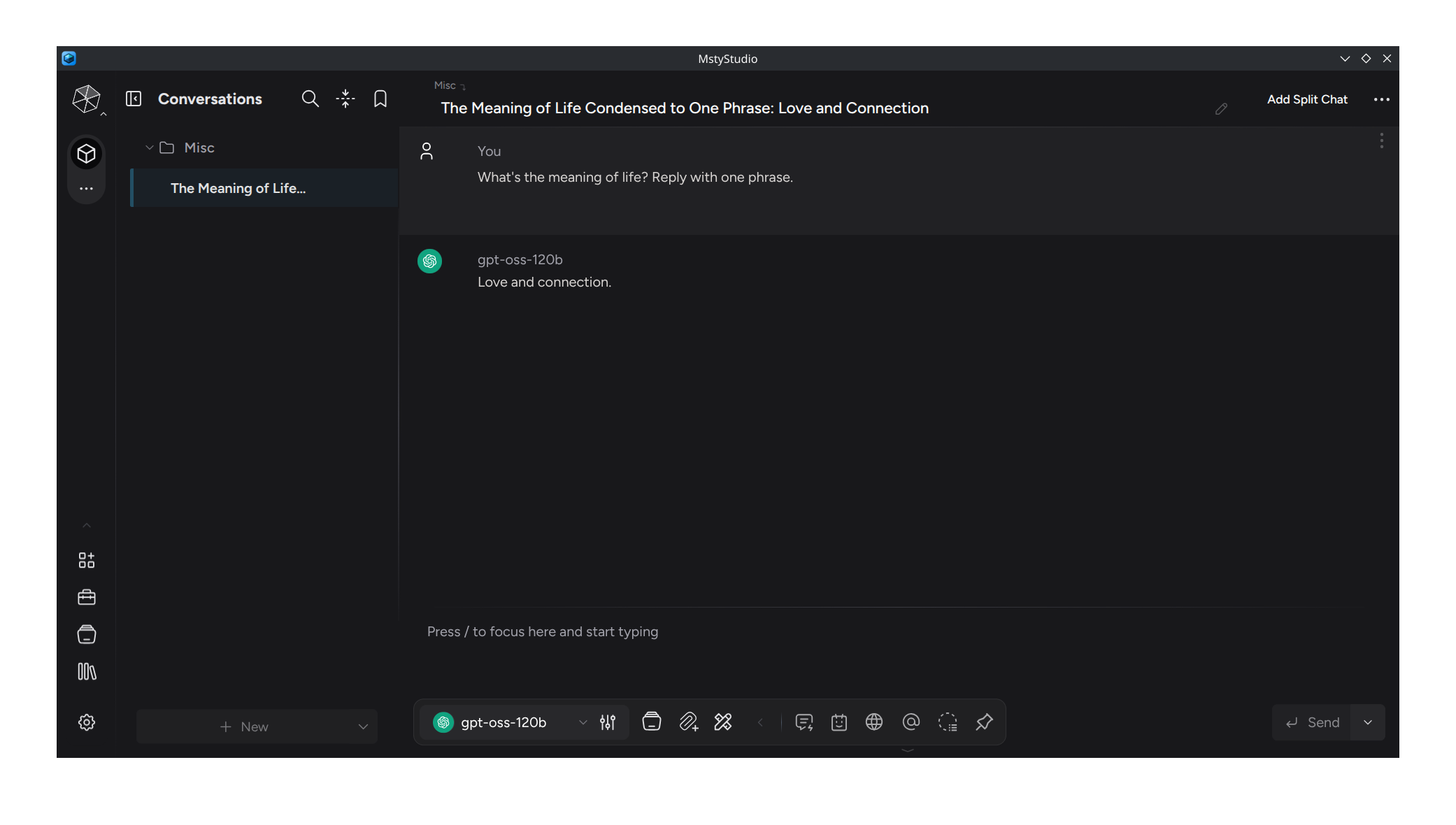
You're now ready to use Msty Studio with PayPerQ! Select your desired model using the Model Chooser, write your question, and click "Send" to start your conversation.
Advanced Features with PayPerQ
Once connected, you can leverage Msty Studio's advanced capabilities:
- Knowledge Stacks: Upload documents and create intelligent knowledge bases that work with PayPerQ models
- Personas: Create specialized AI assistants for different tasks using PayPerQ's diverse model selection
- Turnstiles: Build complex workflows that can switch between different PayPerQ models based on logic conditions
- Privacy Mode: Use PayPerQ models while maintaining complete privacy with local data storage
Problems?
Please contact us through the customer communication chatbot in the bottom right or in our telegram channel!
What is PayPerQ?
PayPerQ is the private way to use AI. You get the big-name models from Anthropic, OpenAI, Google and xAI, the best open-source models, and TEE models that run inside a hardware enclave where not even the model's host can see your data. Chat, image, video and audio, all in one place, with no account and no subscription. You top up a balance with crypto or a card, from as little as 10 cents, and pay only for what you use. Most users spend about $4 a month, against $20+ for a single ChatGPT subscription.
Privacy is built in rather than bolted on. Every chat request is served inside a secure enclave that PayPerQ's servers, staff and logs cannot read into, so PayPerQ never sees your prompts or responses. Choose a TEE model and the model's host cannot read them either.
Why Use PayPerQ?
- Private by default - chats are served inside a secure enclave PayPerQ cannot read, and every chat model shows its privacy tier (Anon, ZDR or TEE)
- No account needed - no sign-up and no email; a credit id is all it takes
- Pay with crypto or card - Bitcoin, Lightning, Monero, stablecoins and more, or a credit card
- Hundreds of AI models from every major provider in one place
- Pay per use - no subscriptions; top up from 10 cents and pay only for what you use, about 1 cent per query on average
- Your history stays yours - conversations are stored on your device by default
Getting Started
- Visit ppq.ai
- Top up your balance with crypto or a card (as little as 10 cents)
- Pick a model, check its privacy tier, and start chatting
No account, no sign-up. Fund and go.