Using JanitorAI Character Chat with PayPerQ
Learn how to connect JanitorAI's character chat platform with PayPerQ's API for unrestricted AI conversations.
What is JanitorAI?
JanitorAI is a popular character AI chat platform that allows you to create and interact with custom AI characters. Whether you're looking for creative roleplay, storytelling, or more personalized conversations, JanitorAI provides a flexible environment for character-based interactions.
Step by Step Set Up
1. Configure API Settings with Proxy
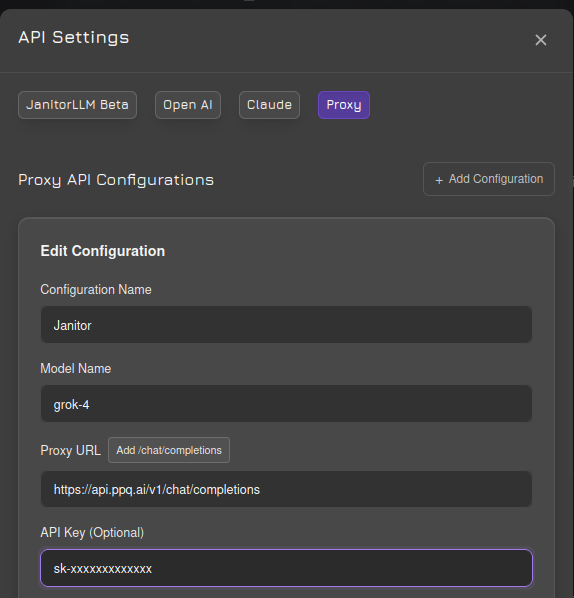
Navigate to JanitorAI's API settings and select the proxy/reverse proxy option. Enter the following configuration:
API URL: https://api.ppq.ai/v1/chat/completions
API Key: Your key from ppq.ai/api-docs
2. Select Your Model
Choose a text model from PayPerQ's available models at ppq.ai/api-docs. Different models offer different capabilities and content policies.
3. Refresh the Website
After saving your settings, refresh the entire JanitorAI website to ensure the new configuration takes effect.
4. Enable Proxy for Custom Characters
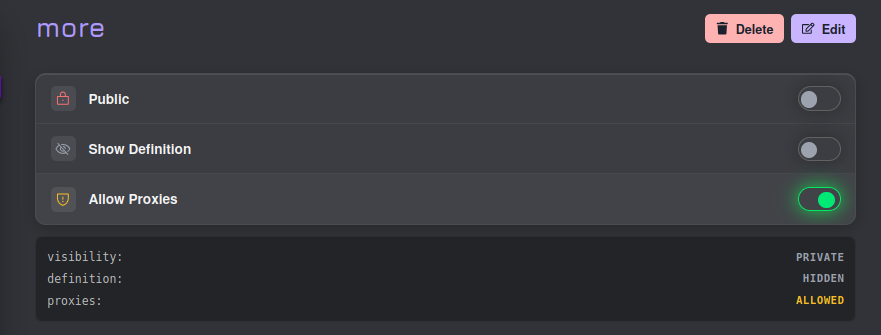
If you're creating your own characters, you need to explicitly allow proxies in your character's settings. Navigate to your character configuration and enable the proxy option:
5. Adjust Max Token Settings
To prevent responses from being cut off mid-conversation, increase the max token limit in the generation settings. This ensures you get complete, uninterrupted responses:
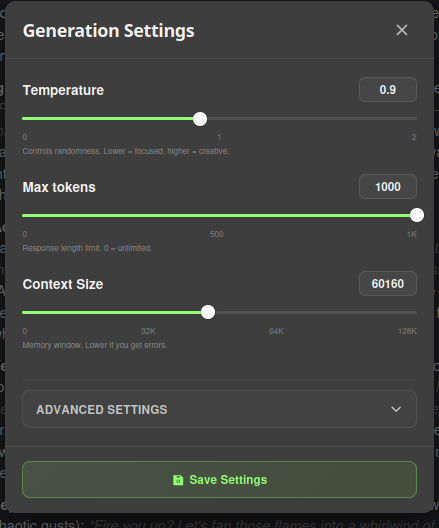
We recommend setting this to a higher value to avoid frustrating cutoffs in individual messages.
Problems?
Please contact us through the customer communication chatbot in the bottom right or in our telegram channel!
What is PayPerQ?
PayPerQ is the private way to use AI. You get the big-name models from Anthropic, OpenAI, Google and xAI, the best open-source models, and TEE models that run inside a hardware enclave where not even the model's host can see your data. Chat, image, video and audio, all in one place, with no account and no subscription. You top up a balance with crypto or a card, from as little as 10 cents, and pay only for what you use. Most users spend about $4 a month, against $20+ for a single ChatGPT subscription.
Privacy is built in rather than bolted on. Every chat request is served inside a secure enclave that PayPerQ's servers, staff and logs cannot read into, so PayPerQ never sees your prompts or responses. Choose a TEE model and the model's host cannot read them either.
Why Use PayPerQ?
- Private by default - chats are served inside a secure enclave PayPerQ cannot read, and every chat model shows its privacy tier (Anon, ZDR or TEE)
- No account needed - no sign-up and no email; a credit id is all it takes
- Pay with crypto or card - Bitcoin, Lightning, Monero, stablecoins and more, or a credit card
- Hundreds of AI models from every major provider in one place
- Pay per use - no subscriptions; top up from 10 cents and pay only for what you use, about 1 cent per query on average
- Your history stays yours - conversations are stored on your device by default
Getting Started
- Visit ppq.ai
- Top up your balance with crypto or a card (as little as 10 cents)
- Pick a model, check its privacy tier, and start chatting
No account, no sign-up. Fund and go.