
Introducing Perplexity Academic Researcher - Scholarly Search on PayPerQ
PayPerQ's new Perplexity Academic Researcher tool answers your research questions using only scholarly sources — every claim cited to peer-reviewed journals, PubMed, arXiv, and academic databases. No subscription required.
We just launched the Perplexity Academic Researcher on PayPerQ — a dedicated research tool that answers your questions using only scholarly sources. Instead of pulling from the open web, it searches peer-reviewed journals, preprint servers, and academic databases — PubMed, arXiv, Nature, Springer, JAMA, and Semantic Scholar's 200M+ paper index — and cites every claim back to the literature.
Under the hood, the tool runs Perplexity's Sonar Reasoning Pro model in academic search mode. Perplexity's academic mode restricts retrieval to scholarly repositories — peer-reviewed journals and preprint servers such as arXiv, PubMed, JSTOR, SSRN, and bioRxiv — rather than blogs, news sites, and forums. The difference matters: a normal web search on a medical or scientific question surfaces whatever ranks well; academic mode surfaces what has actually been published and reviewed.
The result is a research assistant that behaves less like a chatbot and more like a literature review on demand. Ask a focused question, and you get a reasoned synthesis of the published evidence with citations you can follow and verify.
Key Capabilities
- Scholarly sources only — answers draw from peer-reviewed journals, preprints, clinical trials, and academic databases, not the open web
- Every claim cited — each answer links back to the specific papers it's based on, so you can verify and read further
- Reasoning over retrieval — Sonar Reasoning Pro doesn't just fetch papers; it compares findings, weighs evidence, and explains where the literature agrees and disagrees
- Current research — includes recent studies and preprints, so you're not limited to what made it into a model's training data
A few examples of what you can ask:
- "What do peer-reviewed studies say about GLP-1 agonists and Alzheimer's risk?"
- "Summarize recent research on CRISPR base-editing efficiency."
- "What is the current scientific consensus on microplastics and human health?"
- "Compare transformer and state-space models for long-context tasks, with citations."
Whether you're a student writing a literature review, a clinician checking the latest evidence, or just someone who wants answers grounded in actual research rather than SEO content, this tool gets you to the primary sources fast.
How to Use on PayPerQ
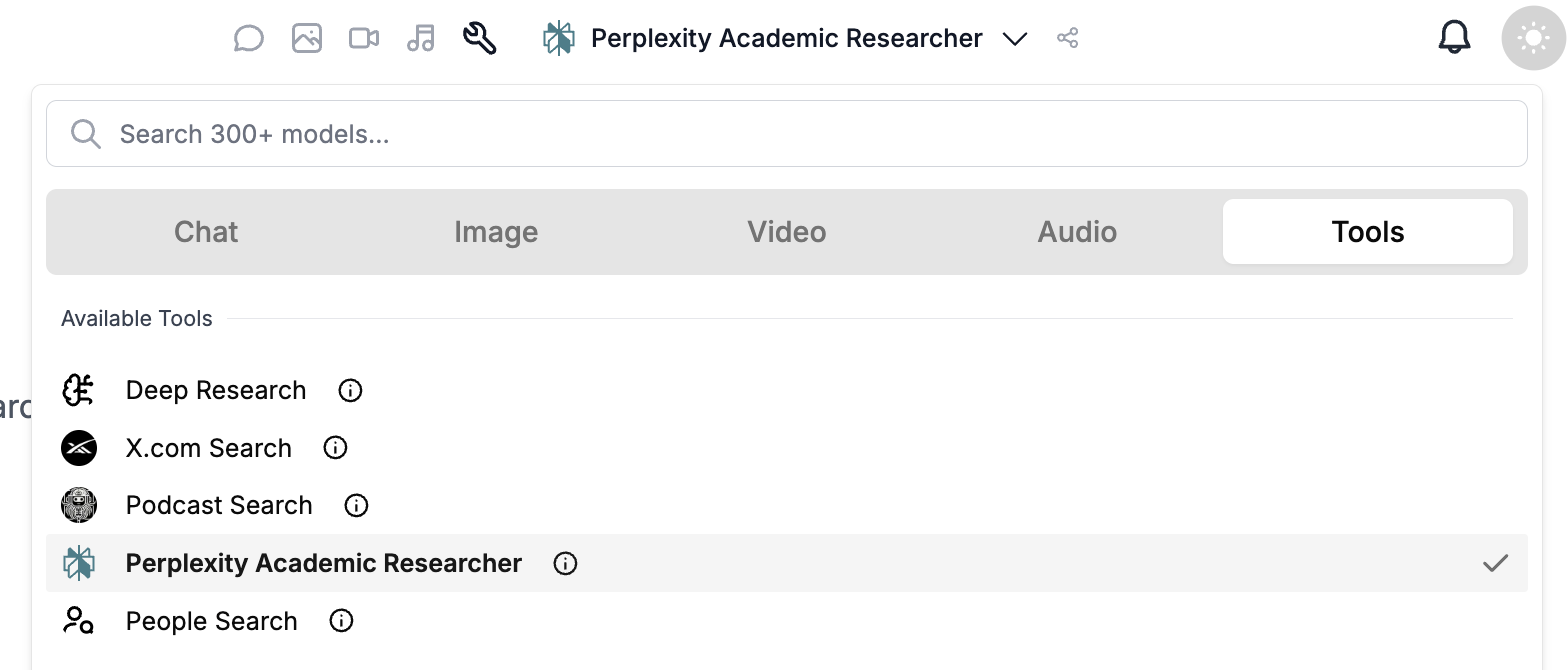
Select Perplexity Academic Researcher from the Tools section of the model picker, ask your research question, and get a cited answer in seconds. You pay per query like any other model on PayPerQ — no Perplexity subscription needed.
Using It via the API
Academic research isn't limited to the web app — you can call it programmatically through PayPerQ's OpenAI-compatible API. Send a request to perplexity/sonar-reasoning-pro and add a single field, "search_mode": "academic", to restrict the search to scholarly sources.
First, grab an API key from your API keys page and top up your balance. Then:
bashcurl https://api.ppq.ai/chat/completions \ -H "Content-Type: application/json" \ -H "Authorization: Bearer YOUR_PPQ_API_KEY" \ -d '{ "model": "perplexity/sonar-reasoning-pro", "search_mode": "academic", "messages": [ {"role": "user", "content": "What does peer-reviewed research say about CRISPR base-editing efficiency?"} ] }'
Because the endpoint is OpenAI-compatible, you can also use the official OpenAI SDKs by pointing them at https://api.ppq.ai/v1 and passing the same search_mode parameter:
pythonfrom openai import OpenAI client = OpenAI(api_key="YOUR_PPQ_API_KEY", base_url="https://api.ppq.ai/v1") response = client.chat.completions.create( model="perplexity/sonar-reasoning-pro", extra_body={"search_mode": "academic"}, messages=[ {"role": "user", "content": "Summarize recent research on GLP-1 agonists and Alzheimer's risk."} ], ) print(response.choices[0].message.content)
The scholarly citations are returned alongside the answer in choices[0].message.annotations, where each entry's url_citation.url links to the source paper — so your application can render a reference list just like the web app does.
What is PayPerQ?
PayPerQ is the private way to use AI. You get the big-name models from Anthropic, OpenAI, Google and xAI, the best open-source models, and TEE models that run inside a hardware enclave where not even the model's host can see your data. Chat, image, video and audio, all in one place, with no account and no subscription. You top up a balance with crypto or a card, from as little as 10 cents, and pay only for what you use. Most users spend about $4 a month, against $20+ for a single ChatGPT subscription.
Privacy is built in rather than bolted on. Every chat request is served inside a secure enclave that PayPerQ's servers, staff and logs cannot read into, so PayPerQ never sees your prompts or responses. Choose a TEE model and the model's host cannot read them either.
Why Use PayPerQ?
- Private by default - chats are served inside a secure enclave PayPerQ cannot read, and every chat model shows its privacy tier (Anon, ZDR or TEE)
- No account needed - no sign-up and no email; a credit id is all it takes
- Pay with crypto or card - Bitcoin, Lightning, Monero, stablecoins and more, or a credit card
- Hundreds of AI models from every major provider in one place
- Pay per use - no subscriptions; top up from 10 cents and pay only for what you use, about 1 cent per query on average
- Your history stays yours - conversations are stored on your device by default
Getting Started
- Visit ppq.ai
- Top up your balance with crypto or a card (as little as 10 cents)
- Pick a model, check its privacy tier, and start chatting
No account, no sign-up. Fund and go.