Using TradingAgents with PayPerQ
Run the TradingAgents multi-agent trading research framework on pay-per-use PayPerQ models instead of a single provider subscription.
What is TradingAgents?
TradingAgents is an open-source multi-agent framework for financial trading research from Tauric Research. A team of LLM agents (analysts, bull and bear researchers, a trader and risk managers) works through a ticker and produces reports and a trading decision.
It runs from an interactive command-line interface or as a Python package, and it supports many LLM providers, including any OpenAI-compatible endpoint, which is how you connect PayPerQ.
Step by Step Set Up
1. Prerequisites
- A PayPerQ account and API key from ppq.ai/api-docs.
- Python 3.11 or later (the TradingAgents docs: "TradingAgents needs Python 3.11 or later").
- Git, to clone the repository.
2. Install TradingAgents
- Run a command to clone the repository:
bashgit clone https://github.com/TauricResearch/TradingAgents.git
- Run a command to enter the folder:
bashcd TradingAgents
- Run a command to create a virtual environment:
bashpython3 -m venv .venv
- Run a command to activate it:
bashsource .venv/bin/activate
- Run a command to install the package and its dependencies:
bashpip install .
The install ends with Successfully installed ... tradingagents-..., and the tradingagents command is now available in this terminal.
Note: the TradingAgents docs create the environment with conda or uv (
uv venv --python 3.13) and say "any of your favorite environment managers" works. If you use uv, install withuv pip install ..
3. Store your PayPerQ key in .env
TradingAgents reads provider keys from a .env file. Keep running the commands from the TradingAgents folder.
- Run a command to create
.envfrom the template:
bashcp .env.example .env
- Edit the file
.envin theTradingAgentsfolder: find the line#OPENAI_COMPATIBLE_API_KEY=, remove the#and put your key after the=:
textOPENAI_COMPATIBLE_API_KEY=<your PayPerQ API key>
Save the file. The TradingAgents docs say to "set OPENAI_COMPATIBLE_API_KEY when the endpoint requires one"; PayPerQ requires one.
4. Start TradingAgents and add PayPerQ as the provider
Run a command to start the interactive CLI:
bashtradingagents
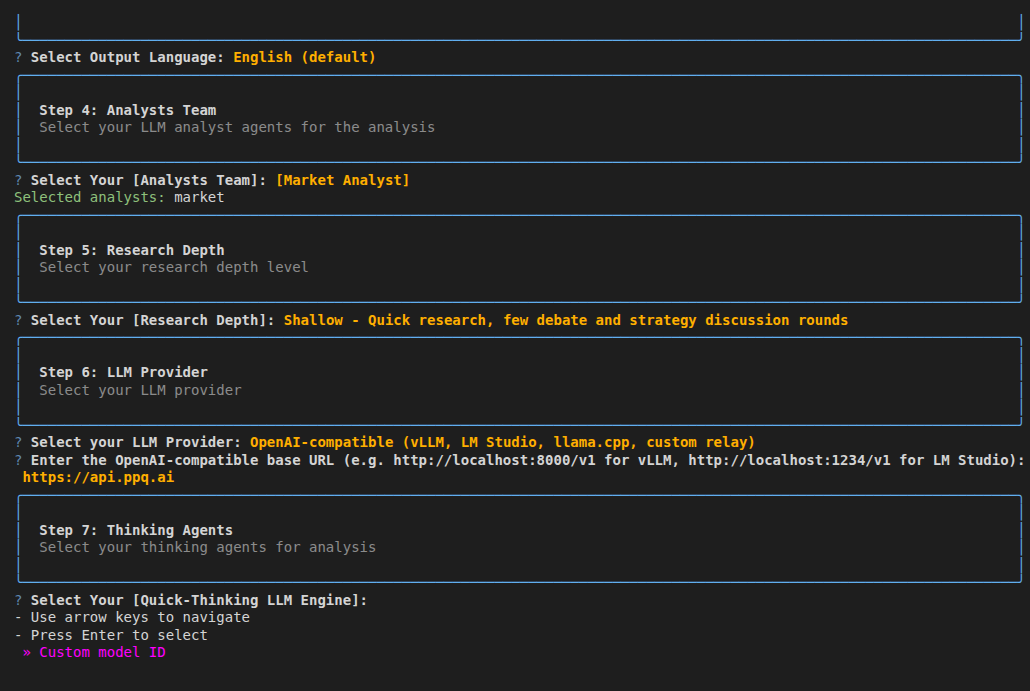
The welcome banner appears, followed by a numbered series of prompts. Answer them in order:
- Step 1: Ticker Symbol. Type
SPYand press Enter (SPY is the default). - Step 2: Analysis Date. Press Enter to accept today's date.
- Step 3: Output Language. Press Enter to keep English.
- Step 4: Analysts Team. Press Space on Market Analyst so it shows a filled circle, then press Enter. One analyst keeps the first run short.
- Step 5: Research Depth. Keep Shallow and press Enter.
- Step 6: LLM Provider. Use the arrow keys to select OpenAI-compatible (vLLM, LM Studio, llama.cpp, custom relay), the last item in the list, and press Enter.
- Enter the OpenAI-compatible base URL. Type
https://api.ppq.aiand press Enter.
You land on Step 7, the model picker.
Note: the next time you start
tradingagents, your previous answers come back as the defaults, so you can press Enter through steps 1 to 6.
5. Pick a model
Step 7 asks for two models. Both pickers show one entry, Custom model ID.
- Quick-Thinking LLM Engine. Press Enter on Custom model ID, type
openai/gpt-oss-120band press Enter. - Deep-Thinking LLM Engine. Press Enter on Custom model ID, type
openai/gpt-oss-120band press Enter.
Note:
openai/gpt-oss-120bcosts $0.02743 per 1M input tokens and $0.100225 per 1M output tokens at the time of writing. See api.ppq.ai/v1/models for current prices and the full model list; use a model ID from that catalog whosesupported_parametersincludetools, because the analysts call tools.
The analysis starts right after the second model ID.
6. Run the analysis and check the answer
The first analysis is the test: the screen switches to a progress panel and the Market Analyst fetches SPY data through its tools and sends it to the PayPerQ model.
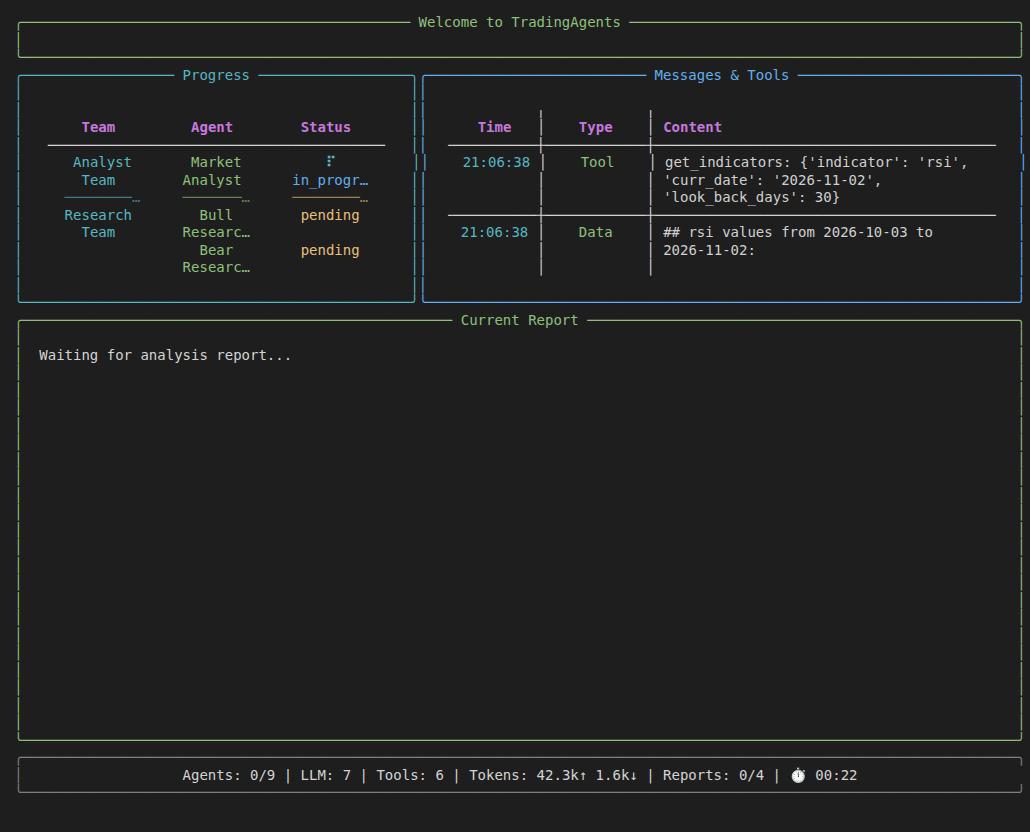
Note: the panel can stay on one agent for several minutes while the model answers. Wait for it.
When the run ends the CLI prints Analysis Complete! and asks:
- Save report? Type
nand press Enter. - Display full report on screen? Press Enter to accept the default.
The screen prints I. Analyst Team Reports with a Market Analyst section: a table of SPY indicators (Close, 10-EMA, 50-SMA, 200-SMA, RSI, MACD) with an interpretation for each, written by the PayPerQ model.
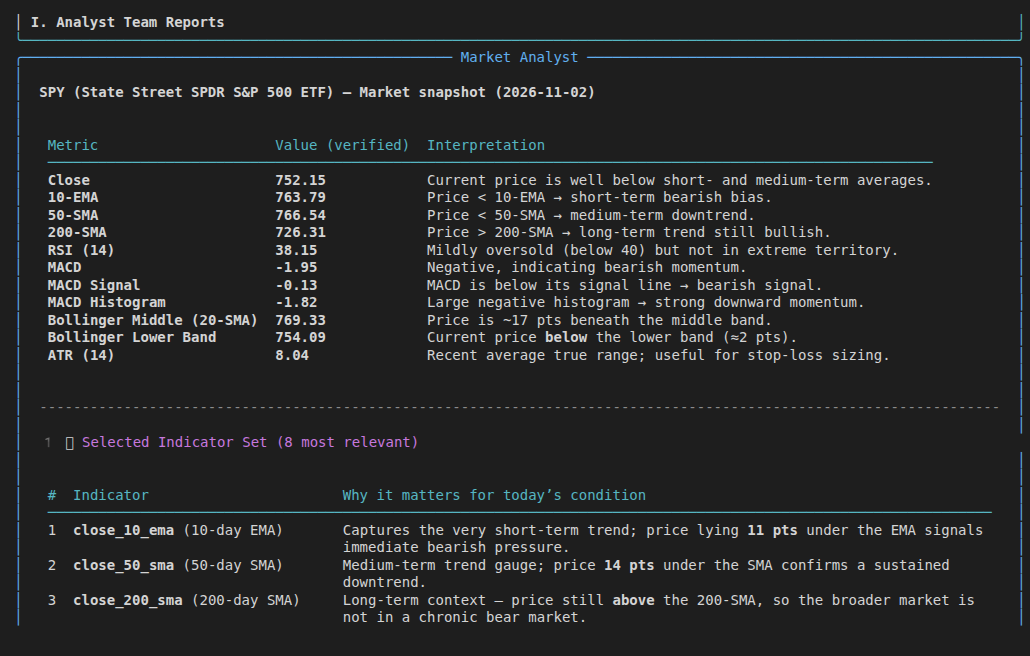
The setup is complete. Check what the run cost on ppq.ai/account-activity. To use another model, start tradingagents again and enter a different model ID in step 7.
Troubleshooting
OpenAIModelNotFoundError: Error code: 404 - No allowed providers are available for the selected model right after you enter the model IDs. What happened: PayPerQ could not route the request for the model you entered. Fix: start tradingagents again and enter openai/gpt-oss-120b, or another ID from api.ppq.ai/v1/models.
Problems?
Please contact us through the customer communication chatbot in the bottom right of the PayPerQ site, in our Telegram channel or on Discord.
This guide is open source. If a step no longer works, open the guide on GitHub and use the pencil icon to propose a fix, or open an issue; changes go live after a PayPerQ maintainer reviews them.
What is PayPerQ?
PayPerQ is the private way to use AI. You get the big-name models from Anthropic, OpenAI, Google and xAI, the best open-source models, and TEE models that run inside a hardware enclave where not even the model's host can see your data. Chat, image, video and audio, all in one place, with no account and no subscription. You top up a balance with crypto or a card, from as little as 10 cents, and pay only for what you use. Most users spend about $4 a month, against $20+ for a single ChatGPT subscription.
Privacy is built in rather than bolted on. Every chat request is served inside a secure enclave that PayPerQ's servers, staff and logs cannot read into, so PayPerQ never sees your prompts or responses. Choose a TEE model and the model's host cannot read them either.
Why Use PayPerQ?
- Private by default - chats are served inside a secure enclave PayPerQ cannot read, and every chat model shows its privacy tier (Anon, ZDR or TEE)
- No account needed - no sign-up and no email; a credit id is all it takes
- Pay with crypto or card - Bitcoin, Lightning, Monero, stablecoins and more, or a credit card
- Hundreds of AI models from every major provider in one place
- Pay per use - no subscriptions; top up from 10 cents and pay only for what you use, about 1 cent per query on average
- Your history stays yours - conversations are stored on your device by default
Getting Started
- Visit ppq.ai
- Top up your balance with crypto or a card (as little as 10 cents)
- Pick a model, check its privacy tier, and start chatting
No account, no sign-up. Fund and go.