Using Qwen Code with PayPerQ
Run the Qwen Code terminal coding agent on pay-per-use PayPerQ models instead of a subscription, using its built-in Custom Provider setup.
What is Qwen Code?
Qwen Code is an open-source AI coding agent that runs in your terminal, made by the Qwen team (QwenLM). It reads and edits files in your project, runs commands and answers questions about your codebase, asking for approval before it changes things. Docs: qwenlm.github.io/qwen-code-docs.
Qwen Code supports OpenAI-compatible endpoints through its Custom Provider option, which is how it connects to PayPerQ here: one API key, pay-per-use pricing, and a choice of models from many vendors.
Step by Step Set Up
1. Prerequisites
- A PayPerQ account and API key. Sign in at ppq.ai and copy the key from ppq.ai/api-docs.
- Linux or macOS for the commands below; the Windows command is in a callout in step 2.
- A project folder to open Qwen Code in.
2. Install Qwen Code
Run a command in your terminal:
bashcurl -fsSL https://qwen-code-assets.oss-cn-hangzhou.aliyuncs.com/installation/install-qwen-standalone.sh | bash
The installer downloads Qwen Code, adds qwen to your PATH and prints Qwen Code ... installed successfully.
Windows: the Qwen Code docs give this PowerShell command instead:
irm https://qwen-code-assets.oss-cn-hangzhou.aliyuncs.com/installation/install-qwen-standalone.ps1 | iex
Shell profile: on macOS the default shell is zsh and the profile is
~/.zshrc; on most Linux distributions it is bash and~/.bashrc; on Windows, PowerShell loads the file named by$PROFILE. Open a new terminal after editing it.
Open a new terminal, then run a command to check the install:
bashqwen --version
It prints a version number, for example 0.28.0.
3. Add PayPerQ as a Custom Provider
Run a command in your project folder:
bashqwen
The "Connect a Provider" menu opens on first launch. Choose a menu item: use the arrow keys to select Custom Provider and press Enter.
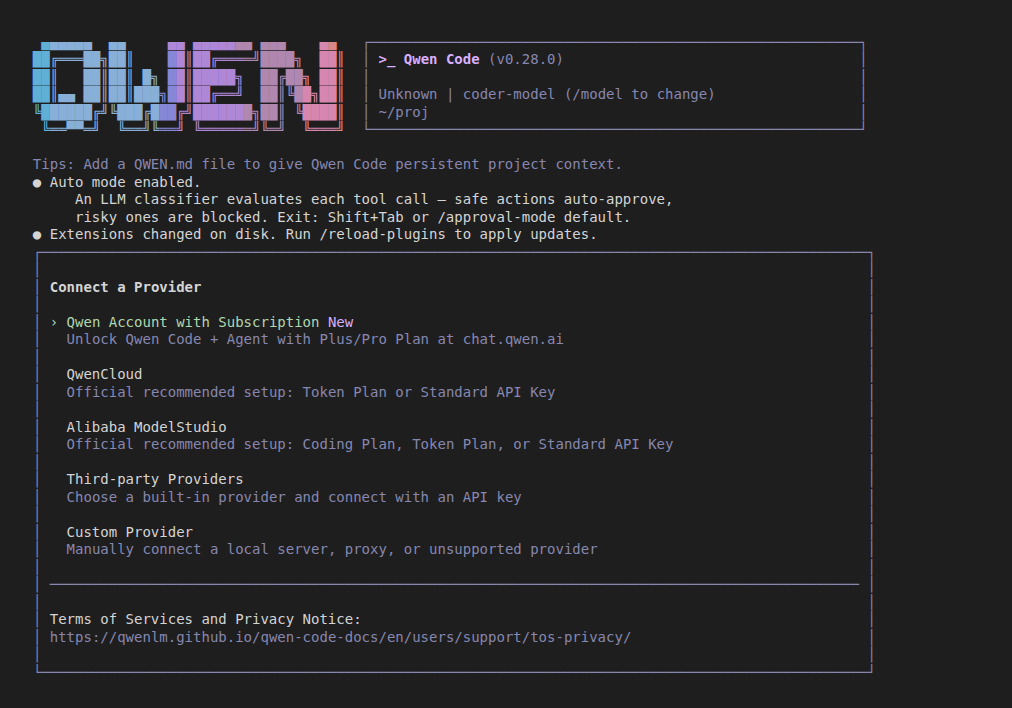
Then answer the seven prompts of the Custom Provider wizard, in order:
- Protocol. Select OpenAI-compatible and press Enter.
- API. Select Chat Completions and press Enter.
- Base URL. The field is prefilled with
https://api.openai.com/v1. Clear it, typehttps://api.ppq.aiand press Enter. - API Key. Paste
<your PayPerQ API key>and press Enter. - Model IDs. Type
qwen/qwen3.7-flashand press Enter. - Advanced generation settings. Leave all options as they are and press Enter.
- Review. Qwen Code shows the settings it will save. Check that the base URL is
https://api.ppq.aiand the model isqwen/qwen3.7-flash, then press Enter.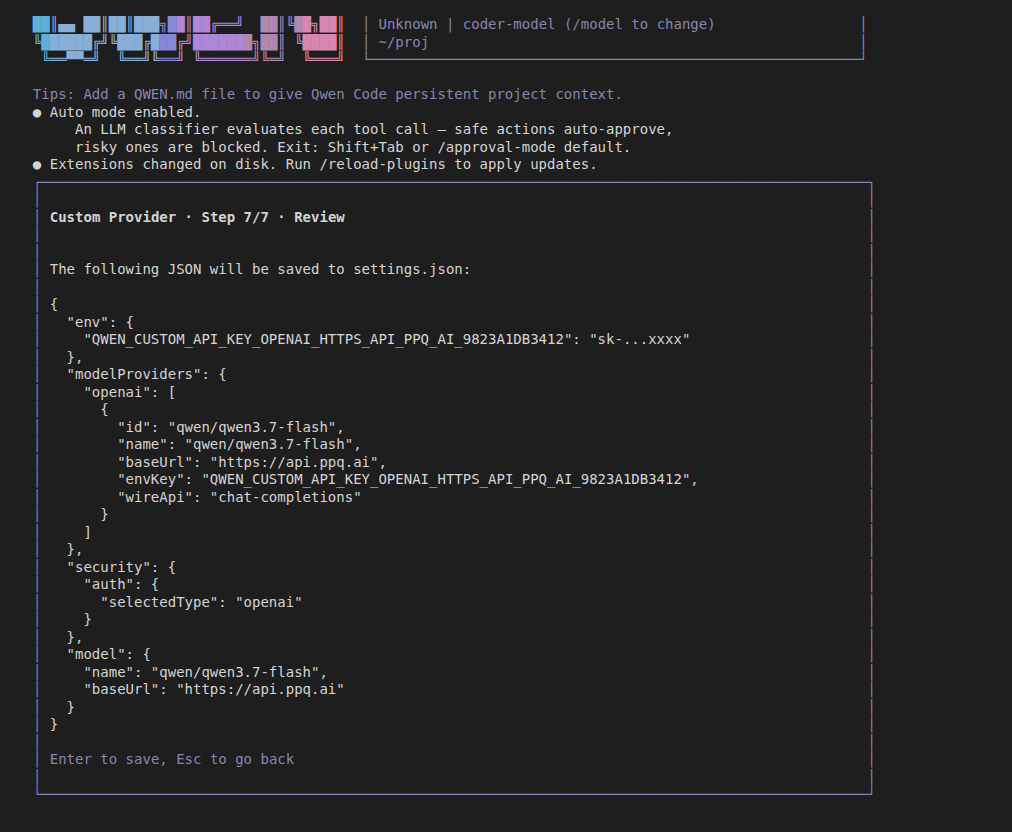
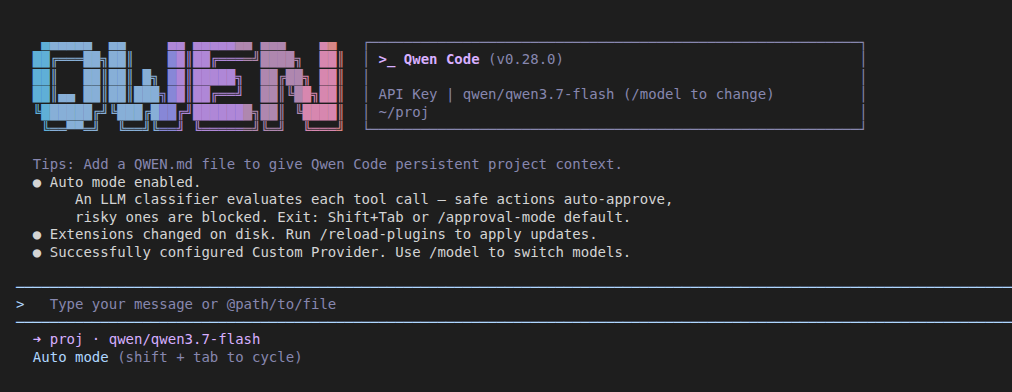
Qwen Code shows Successfully configured Custom Provider. and the model qwen/qwen3.7-flash in the footer.
Note:
qwen/qwen3.7-flashcosts $0.03165 per 1M input tokens and $0.13715 per 1M output tokens at the time of writing. See api.ppq.ai/v1/models for current prices. It is an example: the wizard's Model IDs field takes theidof any model in that catalog, and several IDs can be separated by commas.
Note: the wizard saves the provider and the key in
~/.qwen/settings.json. The Qwen Code docs list where an API key can come from, highest priority first: CLI flags, system environment variables (export),.envfiles, then theenvfield ofsettings.json.
Windows:
~is your user folder, so this file is%USERPROFILE%\.qwen\settings.json.
4. Check the provider and model
Run a command inside Qwen Code:
text/model
The list shows 1. [openai] qwen/qwen3.7-flash, with Base URL: https://api.ppq.ai.
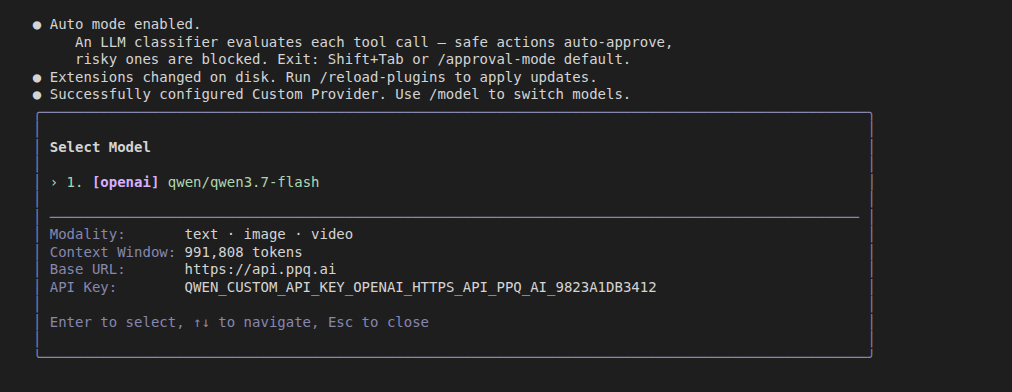
Press Esc to close the list.
5. Send a test prompt
Create a file hello.py in your project folder containing one line, print("hello"), then type this prompt in Qwen Code and press Enter:
textRead hello.py and say in one sentence what it does
Qwen Code shows ✓ Read hello.py followed by a one-sentence answer based on the file's content.
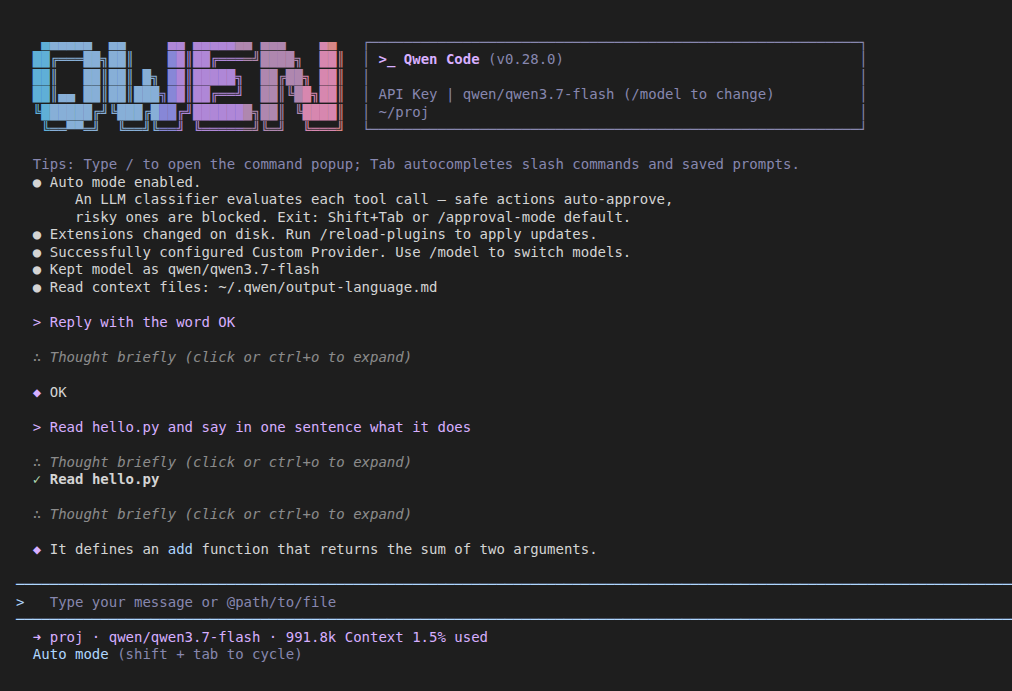
The setup is complete. Check what your requests cost on ppq.ai/account-activity. To use another model, run /model or repeat step 3 with another model ID from the catalog.
Troubleshooting
The model does not answer and Qwen Code reports an authentication error (401). What happened: PayPerQ rejected the key. Likely cause: the key was pasted incompletely or from the wrong place, or the same variable is set from a higher-priority source (see the priority list in step 3). Fix: copy the key again from ppq.ai/api-docs and run /auth → Custom Provider to enter the settings again.
Problems?
Please contact us through the customer communication chatbot in the bottom right of the PayPerQ site, in our Telegram channel or on Discord.
This guide is open source. If a step no longer works, open the guide on GitHub and use the pencil icon to propose a fix, or open an issue; changes go live after a PayPerQ maintainer reviews them.
What is PayPerQ?
PayPerQ is the private way to use AI. You get the big-name models from Anthropic, OpenAI, Google and xAI, the best open-source models, and TEE models that run inside a hardware enclave where not even the model's host can see your data. Chat, image, video and audio, all in one place, with no account and no subscription. You top up a balance with crypto or a card, from as little as 10 cents, and pay only for what you use. Most users spend about $4 a month, against $20+ for a single ChatGPT subscription.
Privacy is built in rather than bolted on. Every chat request is served inside a secure enclave that PayPerQ's servers, staff and logs cannot read into, so PayPerQ never sees your prompts or responses. Choose a TEE model and the model's host cannot read them either.
Why Use PayPerQ?
- Private by default - chats are served inside a secure enclave PayPerQ cannot read, and every chat model shows its privacy tier (Anon, ZDR or TEE)
- No account needed - no sign-up and no email; a credit id is all it takes
- Pay with crypto or card - Bitcoin, Lightning, Monero, stablecoins and more, or a credit card
- Hundreds of AI models from every major provider in one place
- Pay per use - no subscriptions; top up from 10 cents and pay only for what you use, about 1 cent per query on average
- Your history stays yours - conversations are stored on your device by default
Getting Started
- Visit ppq.ai
- Top up your balance with crypto or a card (as little as 10 cents)
- Pick a model, check its privacy tier, and start chatting
No account, no sign-up. Fund and go.