Using JanitorAI Character Chat with PayPerQ
Learn how to connect JanitorAI's character chat platform with PayPerQ's API for unrestricted AI conversations.
What is JanitorAI?
JanitorAI is a popular character AI chat platform that allows you to create and interact with custom AI characters. Whether you're looking for creative roleplay, storytelling, or more personalized conversations, JanitorAI provides a flexible environment for character-based interactions.
Step by Step Set Up
1. Configure API Settings with Proxy
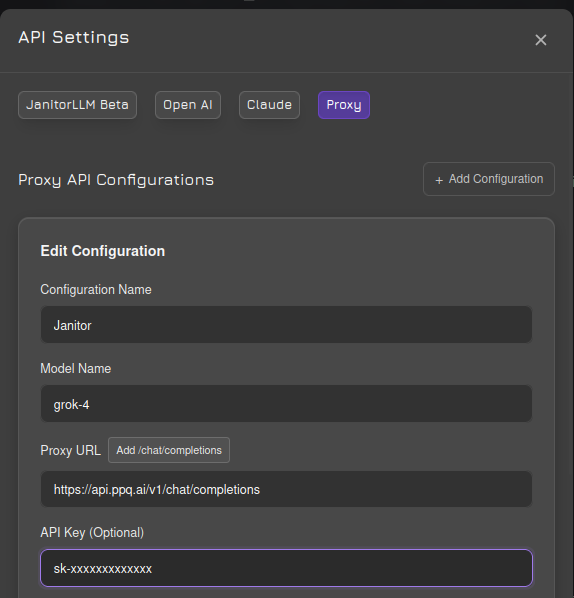
Navigate to JanitorAI's API settings and select the proxy/reverse proxy option. Enter the following configuration:
API URL: https://api.ppq.ai/v1/chat/completions
API Key: Your key from ppq.ai/api-docs
2. Select Your Model
Choose a text model from PayPerQ's available models at ppq.ai/api-docs. Different models offer different capabilities and content policies.
3. Refresh the Website
After saving your settings, refresh the entire JanitorAI website to ensure the new configuration takes effect.
4. Enable Proxy for Custom Characters
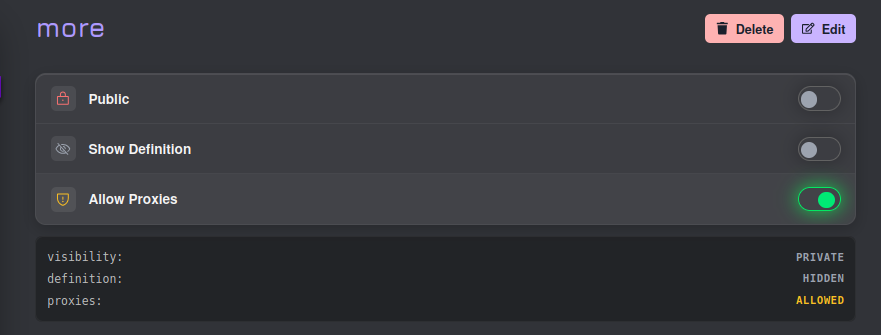
If you're creating your own characters, you need to explicitly allow proxies in your character's settings. Navigate to your character configuration and enable the proxy option:
5. Adjust Max Token Settings
To prevent responses from being cut off mid-conversation, increase the max token limit in the generation settings. This ensures you get complete, uninterrupted responses:

We recommend setting this to a higher value to avoid frustrating cutoffs in individual messages.
Problems?
Please contact us through the customer communication chatbot in the bottom right or in our telegram channel!