Using Daily Stock Analysis with PayPerQ
Run Daily Stock Analysis, the open-source LLM stock analyzer, on pay-per-use PayPerQ models instead of a subscription.
What is Daily Stock Analysis?
Daily Stock Analysis (DSA) is an open-source, LLM-driven stock analysis system. It covers A-shares, Hong Kong and US stocks, combines quotes, news, technicals and fundamentals, and produces a daily decision dashboard for each stock on your watchlist. The project lives at github.com/ZhuLinsen/daily_stock_analysis and its site is dsa.zhulinsen.tech.
DSA reaches its models through LiteLLM and accepts any OpenAI-compatible platform, which is how it connects to PayPerQ. This guide runs it locally from a clone of the repository and analyzes one stock with a PayPerQ model.
Step by Step Set Up
1. Prerequisites
- A PayPerQ account and API key: copy the key from ppq.ai/api-docs.
- Python 3.10 or newer (the project's docs recommend "Python 3.10+").
- Git.
Note: the project's site lists Linux, macOS and Windows as supported operating systems.
2. Download Daily Stock Analysis
Run this command to clone the repository and enter it:
bashgit clone https://github.com/ZhuLinsen/daily_stock_analysis.git && cd daily_stock_analysis
Git downloads the project and your terminal is now in the daily_stock_analysis folder.
3. Install the dependencies
Run this command to create a virtual environment:
bashpython3 -m venv .venv
Run this command to activate it:
bashsource .venv/bin/activate
Your prompt now starts with (.venv). Run this command to install the requirements (it takes a couple of minutes):
bashpip install -r requirements.txt
It ends without an error after listing the installed packages.
Windows: the project's docs install the requirements from PowerShell with these commands, setting UTF-8 first:
$env:PYTHONUTF8='1',$env:PYTHONIOENCODING='utf-8', thenpython -m pip install -r requirements.txt.
4. Create the configuration file
Run this command to copy the example configuration to .env:
bashcp .env.example .env
A file named .env now exists in the project folder.
5. Add PayPerQ as the provider
Edit the file .env in the project folder (use any text editor) and add these three lines at the end:
envOPENAI_API_KEY=<your PayPerQ API key> OPENAI_BASE_URL=https://api.ppq.ai/v1 LITELLM_MODEL=openai/inclusionai/ling-3.0-flash
Save the file. OPENAI_API_KEY and OPENAI_BASE_URL are DSA's settings for an OpenAI-compatible platform, and LITELLM_MODEL must start with openai/ followed by the PayPerQ model ID.
Note:
inclusionai/ling-3.0-flashcosts $0.022155 per 1M input tokens and $0.066465 per 1M output tokens at the time of writing. Current prices are in the catalog at api.ppq.ai/v1/models.
Note: the model line is an example. Pick any ID from the full catalog and write it after
openai/. The catalog is JSON with one entry per model; forLITELLM_MODEL, use the entry'sidfield.
Note: DSA's docs state that if you enable
LLM_CHANNELS, "any standardDEEPSEEK_API_KEYorOPENAI_API_KEYdeclared independently will be completely ignored". Do not setLLM_CHANNELSwhile you use the three lines above.
6. Check the connection
Run this command to send DSA's built-in LLM test:
bashpython scripts/check_env.py --llm
The test runs a sample analysis and takes around half a minute. The output ends with ✓ API 调用成功 followed by --- 分析结果 --- and the sample result. The output is in Chinese by default.
7. Send a test prompt
Run this command to analyze one stock through DSA's normal analysis flow, without sending notifications and without the market review:
bashpython main.py --stocks AAPL --no-notify --no-market-review
DSA downloads the quotes, calls your PayPerQ model and takes about a minute. The log ends with 成功: 1, 失败: 0 and a line with the stock, advice and score, for example Apple Inc.(AAPL): 持有观察 | 评分 59 | 看多. The report is saved as a Markdown file in the reports folder.
Tip: reports are written in Chinese by default. Add
REPORT_LANGUAGE=enas a new line in.envand run the command again to get an English report.
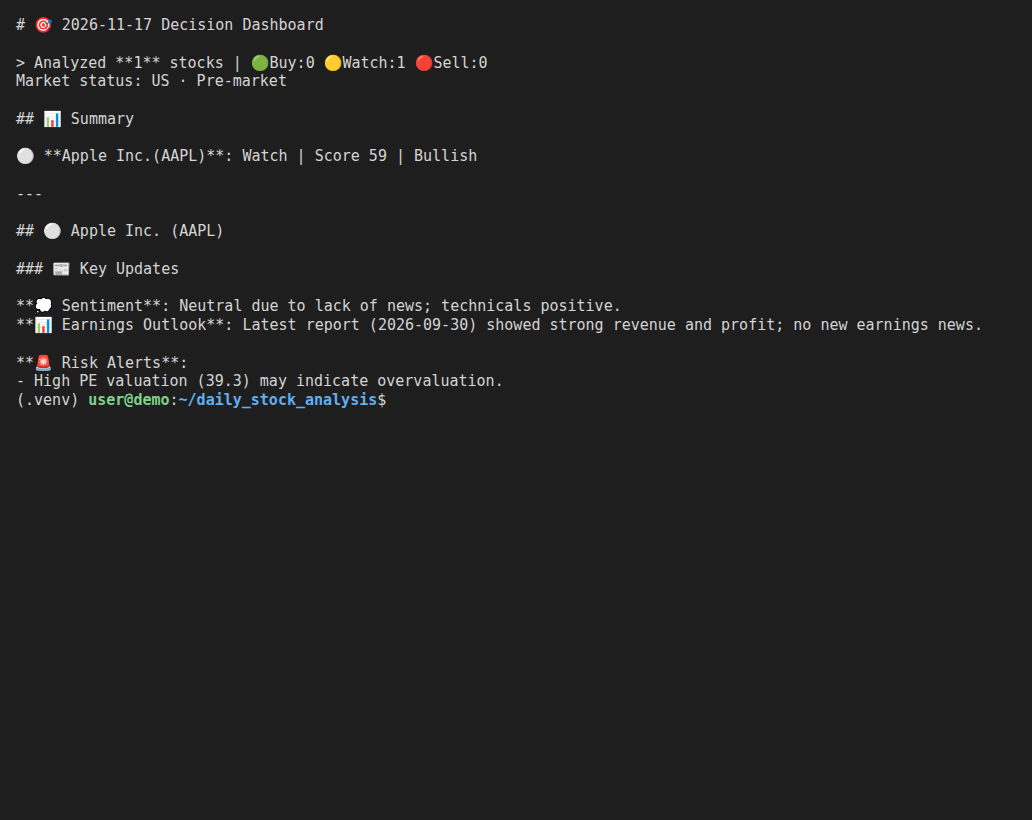
Your setup is complete: DSA is analyzing stocks with a PayPerQ model. Check what each run cost at ppq.ai/account-activity. To use another model, change the LITELLM_MODEL line in .env.
Troubleshooting
Error 400, 401 or "Invalid API Key" when running a command. What happened: PayPerQ or DSA rejected the request. Likely cause (from DSA's troubleshooting table): the key was copied incompletely or has spaces around it, the base URL does not end with /v1, the model name lacks the openai/ prefix, or the account has no credit. Fix: re-copy the key from ppq.ai/api-docs, compare the three lines in step 5 character by character, and check your balance on PayPerQ. Also check that .env has no LLM_CHANNELS line, which makes DSA ignore OPENAI_API_KEY.
The interface says the primary model is not configured. What happened: DSA does not know which model to use. Likely cause: the LITELLM_MODEL line is missing or misspelled. Fix: add LITELLM_MODEL=openai/<model ID> to .env, as in step 5.
The log shows "搜索服务不可用,跳过情报搜索" (news search unavailable) or a warning that all chip-distribution sources failed. What happened: no news-search provider is configured, and one data source returned nothing. The analysis still finishes. Fix: DSA's docs recommend configuring at least one news search provider for better sentiment and catalyst coverage; see its search configuration.
Problems?
Please contact us through the customer communication chatbot in the bottom right of the PayPerQ site, in our Telegram channel or on Discord.
This guide is open source. If a step no longer works, open the guide on GitHub and use the pencil icon to propose a fix, or open an issue; changes go live after a PayPerQ maintainer reviews them.
What is PayPerQ?
PayPerQ is the private way to use AI. You get the big-name models from Anthropic, OpenAI, Google and xAI, the best open-source models, and TEE models that run inside a hardware enclave where not even the model's host can see your data. Chat, image, video and audio, all in one place, with no account and no subscription. You top up a balance with crypto or a card, from as little as 10 cents, and pay only for what you use. Most users spend about $4 a month, against $20+ for a single ChatGPT subscription.
Privacy is built in rather than bolted on. Every chat request is served inside a secure enclave that PayPerQ's servers, staff and logs cannot read into, so PayPerQ never sees your prompts or responses. Choose a TEE model and the model's host cannot read them either.
Why Use PayPerQ?
- Private by default - chats are served inside a secure enclave PayPerQ cannot read, and every chat model shows its privacy tier (Anon, ZDR or TEE)
- No account needed - no sign-up and no email; a credit id is all it takes
- Pay with crypto or card - Bitcoin, Lightning, Monero, stablecoins and more, or a credit card
- Hundreds of AI models from every major provider in one place
- Pay per use - no subscriptions; top up from 10 cents and pay only for what you use, about 1 cent per query on average
- Your history stays yours - conversations are stored on your device by default
Getting Started
- Visit ppq.ai
- Top up your balance with crypto or a card (as little as 10 cents)
- Pick a model, check its privacy tier, and start chatting
No account, no sign-up. Fund and go.