PII Redaction on PayPerQ: Keep Personal Data Away From AI Providers
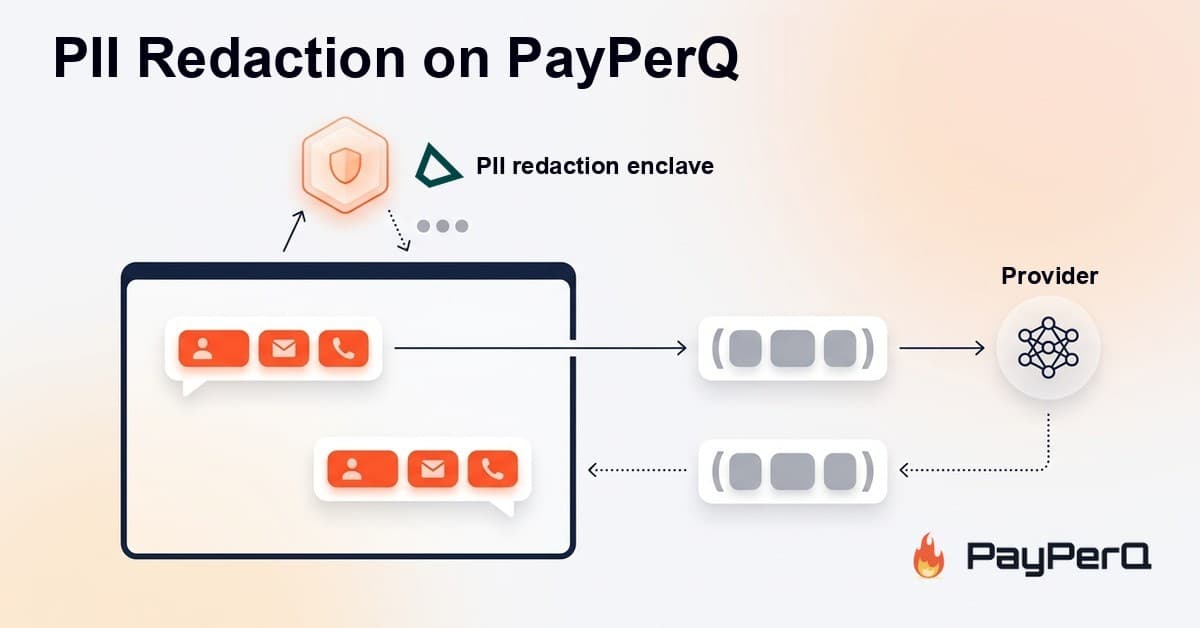
Turn on PII Redaction and names, emails, phone numbers, IDs, card and bank numbers are swapped for placeholders before your message reaches the AI model provider, then restored in the reply. Detection runs in a secure enclave.
Personal data, replaced before it leaves
Real questions often carry real people in them. A contract with a client's name. An email thread with phone numbers. A support ticket with an account ID.
PII Redaction is a new option on PayPerQ that keeps that kind of personal data away from the AI model provider. Before your message is sent, names, email addresses, phone numbers, IDs, card numbers and bank numbers are replaced with placeholders. The model answers using the placeholders, and PayPerQ puts the real values back as the reply streams in.
You read "Maria Silva". The provider only saw something like ⟦PERSON_1⟧.
PII Redaction is off by default. You choose when to turn it on.
What gets protected
When PII Redaction is on, it covers:
- Names of people
- Email addresses and phone numbers
- ID numbers
- Card numbers and bank numbers
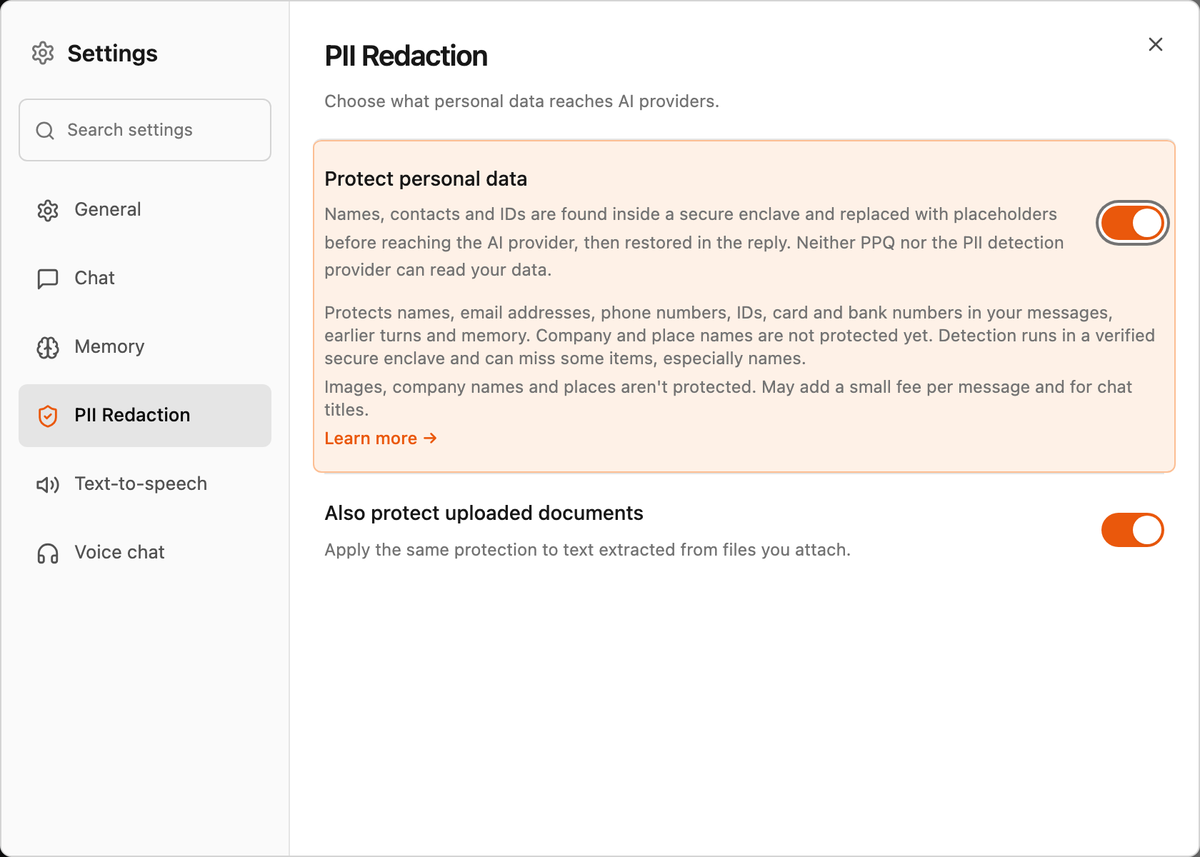
It applies to the message you're sending, to the earlier turns of the conversation, and to your memory when it's attached to the request. With the optional Also protect uploaded documents switch, the same protection applies to text extracted from files you attach.
A few examples of where it helps:
- Asking for a reply to an email that includes the sender's name, address and phone number
- Summarizing a contract or invoice that lists people and account numbers
- Drafting a message about a customer case without sending the customer's details to the model provider
Where the detection runs
To replace personal data, something has to read it first. On PayPerQ that reader is Tinfoil's PII detection service, which runs inside a secure enclave: attested, confidential-computing hardware whose code can be verified before any text is sent to it. It is the same platform behind our TEE models. The swap and the restore then happen in different places depending on how you reach PayPerQ.
In the web app, everything happens in your browser. Your browser verifies Tinfoil's enclave, encrypts the text directly to it, and gets back only the positions of the personal data it found. Your browser then swaps in the placeholders, sends the already-redacted message, and restores the real values as the reply streams in. PayPerQ's servers relay ciphertext to Tinfoil and bill the call; they never see the text, and the placeholder mapping never leaves your browser.
Through the API, PayPerQ's own attested enclave does the same work on your behalf: it verifies Tinfoil's enclave, encrypts the text to it, swaps in the placeholders before forwarding to the model provider, and restores the values in the response. The mapping lives only in enclave memory for that one request.
Either way, neither PayPerQ nor Tinfoil can read your data. The AI model provider receives placeholders, not the personal data.
What it doesn't do (yet)
We'd rather you know the limits up front:
- Detection can miss items, especially names. Treat it as a strong layer of protection, not a guarantee.
- Company and place names are not protected yet.
- Images are never touched. Personal data inside a picture is sent as-is.
- Web search sees placeholders. If you search about a protected person or company, results about them may be missing or wrong.
- Some models and tools are not supported. When that happens, the app shows a notice and sends your message as written.
The shield in the chat input
Once it's set up, a shield icon in the chat input shows the protection status at a glance: orange when PII Redaction is on, grey when it's off. Click it to see the details and jump to the setting.
Pricing
PII Redaction costs a flat $0.00575 per protected message, no matter how long the message is. Each message is one call to the detector. When you start a new conversation, generating its title is one more call.
The fee appears as its own line in your account activity, so you can always see what protection cost you.
How to Use on PayPerQ
In the web app
Open Settings → PII Redaction and turn on Protect personal data. If you also want files you attach to be covered, turn on Also protect uploaded documents.
Through the API
Add "pii_redaction": true to the body of a chat completions request:
bashcurl -X POST https://api.ppq.ai/chat/completions \ -H "Authorization: Bearer $PPQ_API_KEY" \ -H "Content-Type: application/json" \ -d '{ "model": "claude-sonnet-5.5", "pii_redaction": true, "messages": [ { "role": "user", "content": "Write a short reply to Maria Silva (maria.silva@example.com) confirming our call on Friday." } ] }'
A few rules worth knowing:
pii_redactionmust be a boolean. Any other value returns 400 with the codepii_redaction_invalid.- Redaction is only honored on the enclave path. If a request can't be redacted, the API refuses it with 503 and the code
pii_redaction_unavailable. It never falls back to sending your data unredacted. - The same flag works on
/v1/messagesand/v1/responses. It is not available forprivate/*models, which already run inside a TEE.
The full list of error codes and the OpenAI SDK extra_body form are in the API docs.
What is PayPerQ?
PayPerQ is a pay-per-query AI service that gives you instant access to hundreds of chat, image, video, and audio AI models in one place. Unlike traditional ChatGPT subscription that charges $20+ per month, PPQ users pay only for what they use—averaging just $4 a month.
Account registration optional. No monthly commitments. Privacy focused. Credit cards and all major cryptos accepted. Just top up with as little as 10 cents and start using premium AI immediately.
Why Use PayPerQ?
- Access hundreds of AI models from all major providers in one place
- Pay per use - no subscriptions, no wasted money on unused credits
- No registration required - start using AI in seconds
- Start small - top up with as little as 10 cents
- Privacy-first - conversational data stored locally by default
- Average cost: ~1 cent per query
Getting Started
- Visit ppq.ai
- Top up your balance (crypto or credit card, as little as 10 cents)
- Select your model and start chatting
No account creation needed—just fund and go.