Introducing Multi-Model Chat - Ask Multiple Models, Compare Their Answers, Synthesize the Best
Send one prompt to up to four AI models at once, read their answers side by side, and let another model compare them, resolve the disagreements, and write a single final answer.
You already do this. You have a question that matters, so you paste it into ChatGPT, then into Claude, then into Gemini. Three tabs, three answers, and you sit there reading them against each other trying to work out where they agree and where one of them is quietly wrong.
You do it because no model is the best one at everything, and because the interesting information is often not in any single answer - it is in the gap between them. When four models agree, that is a signal. When one of them says something the other three never mention, that is a bigger one.
That whole workflow is now a single message on PayPerQ.
One prompt, multiple perspectives
Open the model selector and turn on Use multiple models. The list becomes a set of checkboxes: pick up to four. Send your message once, and all of them work the same problem at the same time, side by side.
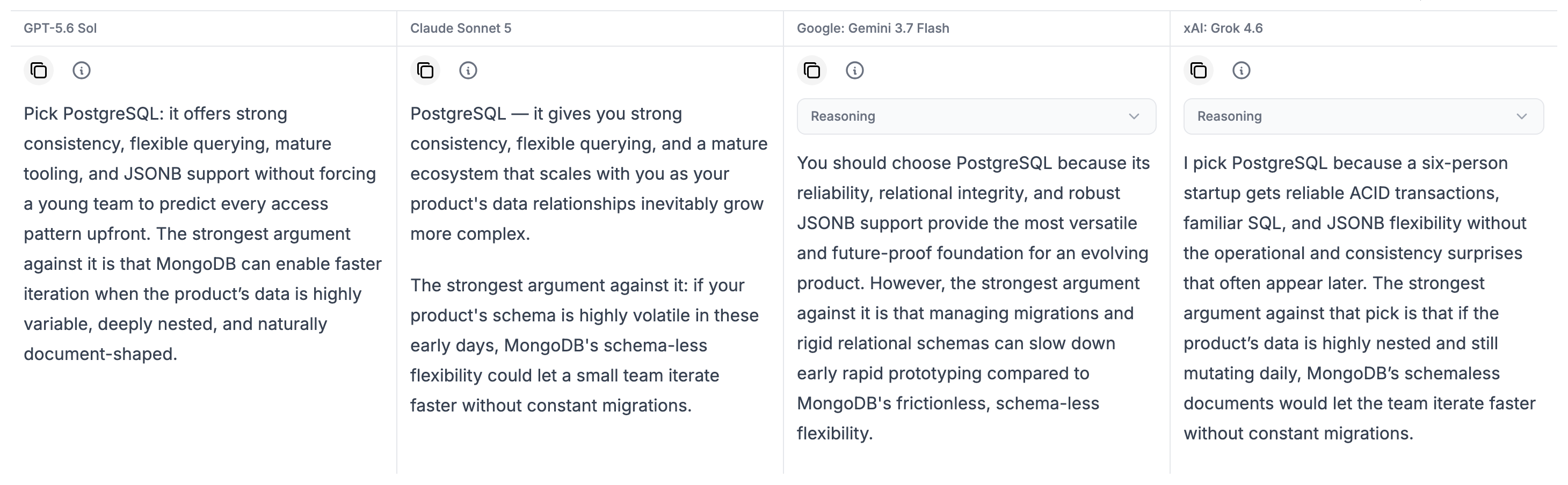
What you get back is not four chances at the same answer. It is four approaches: different reasoning, different priorities, different things left out. Reading them next to each other is the point.
Nothing about single-model chat changes. Leave the toggle off and PayPerQ behaves exactly as it did before.
Turn several answers into one
Different approaches are only useful if you can do something with them. So there is a second toggle: Synthesis.
With Synthesis on, once the columns have finished, another model reads every answer and writes a single consolidated one. It compares the approaches, resolves the disagreements, and keeps the strongest parts of each. You choose which model does the synthesizing from the Synthesizer dropdown, and it does not have to be one of the models that answered - a cheap model can consolidate four expensive ones, or four fast answers can go to a stronger model and let it arbitrate.
You still get the raw answers. The synthesis is shown as three steps you can expand: Sources, the answers it read; Analysis, where it sorts them into agreement, key differences, partial coverage, unique insights, and blind spots; and Result, the final consolidated answer.
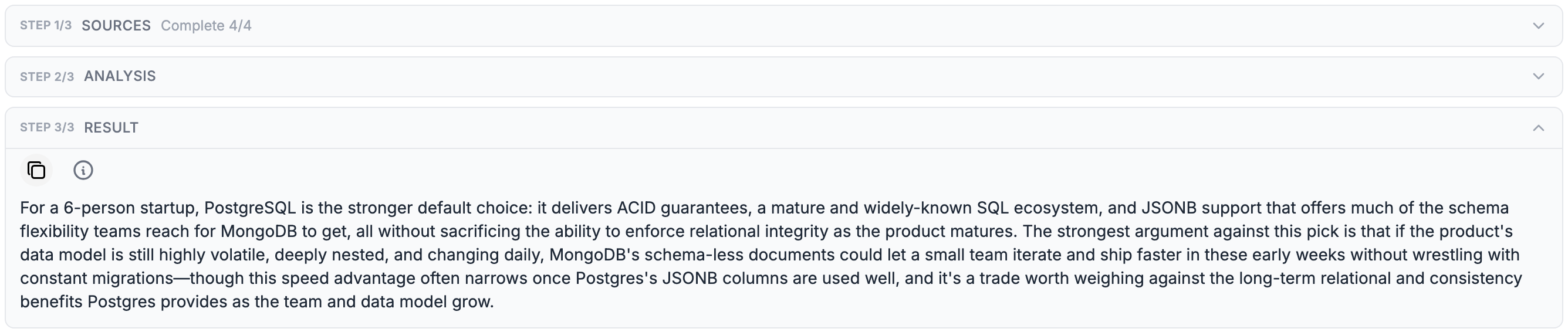
That Analysis step is often worth more than the result itself. "All four picked the same thing" and "three agreed and the fourth raised something none of the others did" are very different situations, and you would not see the difference by reading a single answer.
You do not have to decide up front, either. If a turn comes back and the answers are further apart than you expected, a Synthesize button sits under it - choose a model there and consolidate that turn after the fact.
When Multi-Model is useful
- Code - compare implementations, or competing theories about the same bug.
- Research - see where models agree and where they disagree.
- Writing - compare tone, structure, and phrasing.
- Decisions - get several independent perspectives on the same assumptions.
- Hard questions - synthesize different approaches into one answer.
Each selected model is billed as a separate completion, and Synthesis adds one more. Every panel turn shows a combined Turn total, so you can see exactly what the full comparison cost.
The details that make it practical
- Two layouts. Read the answers as columns side by side, or stacked one per row. Your choice is remembered across devices.
- Mobile. Below tablet width the columns become tabs, so a four-model turn is still readable on a phone.
- One column failed? Retry just that one. The other answers stay exactly as they were, and you are only billed for the retry.
- Share the whole thing. A shared conversation link carries every column, so the person you send it to sees the same comparison you did - not just the answer you liked.
Try it
Open a new chat, click the model selector, and turn on Use multiple models. Pick two to start - the difference between them is usually obvious on the first question you actually care about.
Use one model when one is enough. Use several when the answer actually matters.
What is PayPerQ?
PayPerQ is a pay-per-query AI service that gives you instant access to hundreds of chat, image, video, and audio AI models in one place. Unlike traditional ChatGPT subscription that charges $20+ per month, PPQ users pay only for what they use—averaging just $4 a month.
Account registration optional. No monthly commitments. Privacy focused. Credit cards and all major cryptos accepted. Just top up with as little as 10 cents and start using premium AI immediately.
Why Use PayPerQ?
- Access hundreds of AI models from all major providers in one place
- Pay per use - no subscriptions, no wasted money on unused credits
- No registration required - start using AI in seconds
- Start small - top up with as little as 10 cents
- Privacy-first - conversational data stored locally by default
- Average cost: ~1 cent per query
Getting Started
- Visit ppq.ai
- Top up your balance (crypto or credit card, as little as 10 cents)
- Open the model selector, turn on Use multiple models, and pick your panel
No account creation needed—just fund and go.